
Copy a field and its properties (MDB)
Note The information in this topic applies only to a Microsoft Access database (.mdb).
This procedure only copies a field's definition; it doesn't copy any values in the field.
- Open a table in Design view.
- Select the field or fields you want to copy.
To select one field, click that field's row selector.
To select a group of fields, drag through the row selectors of those fields.
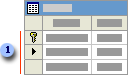
 Row selectors
 - Click Copy
 on the toolbar and then click in the first blank row.
 - Click Paste
 on the toolbar.
 - Type a new name for the copied field.