Simulate an Order Entry
Open a browser session and in the address entry field of the browser type:
Open a browser session and in the address entry field of the browser type:
http://nnn.nnn.nnn.nnn:xx/CGI-BIN/LANSAWEB?PROCFUN+set_176+set176c+ppp
where
This page is displayed:
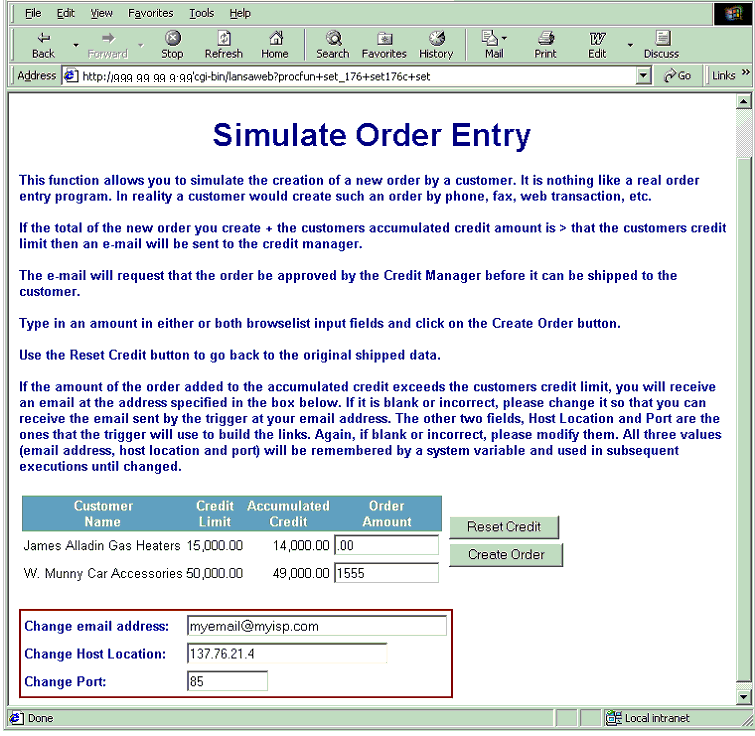
To create an order, input an amount for one or both customers and click on Create Order. To go back to the shipped data, click on the Reset Credit button.
where
| nnn.nnn.nnn.nnn | is the IP address of the iSeries you are connecting to |
| Xx | is the port number where your web server has been configured to run. If your web server uses the default port 80, this parameter is not required. |
| ppp | is the partition identifier of the partition where you imported the material |
This page is displayed:
To create an order, input an amount for one or both customers and click on Create Order. To go back to the shipped data, click on the Reset Credit button.