FORMat Subsystem Introduction
FORMat Subsystem Introduction
During a scan, the instrument automatically adds a time stamp to all readings and stores them in memory. Each reading is also stored with measurement units, time stamp, channel number, and alarm status information. You can specify which information you want returned with the readings (from the front panel, all of the information is available for viewing). The reading format applies to all readings being removed from the instrument from a scan; you cannot set the format on a per-channel basis. The examples below show a reading in relative and absolute format with all fields enabled.
Note that absolute format shows the time of day with the date, and relative time shows the time since the start of the scan.
Relative Format (Default):
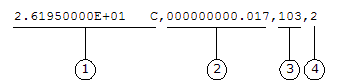
| 1 Reading with Units (26.195 |
3 Channel Number | |
| 2 Elapsed Time (17 ms) | 4 Alarm Limit Threshold Crossed (0 = No Alarm, 1 = LO, 2 = HI) |
Absolute Format (Default):

| 1 Reading with Units (26.195 |
4 Channel Number | |
| 2 Date (November 21, 2004) | 5 Alarm Limit Threshold Crossed (0 = No Alarm, 1 = LO, 2 = HI) | |
| 3 Time of Day (3:30:23.000 PM) |
The FORMat commands are valid only with the following Keysight 34970A/34972A plug-in modules, which can be configured to be part of a scan. The internal DMM must also be installed and enabled.
34901A 20 Channel Multiplexer (2/4-wire) Module
34902A 16 Channel Multiplexer (2/4-wire) Module
34903A 20 Channel Actuator/GP Switch Module
34904A 4 x 8 Two-Wire Matrix Module
34905A 2 GHz Dual 1:4 RF Mux, 50 Ohm Module
34906A 2 GHz Dual 1:4 RF Mux, 75 Ohm Module
34907A Multifunction Module
34908A 40 Channel Single-Ended Multiplexer Module