Presence
From GameSpy SDK
Presence SDK
Overview
The GameSpy Presence and Messaging SDK (GP) is an ANSI-C library that can be used by a game to add both account creation/authorization and "buddy list" functionality. If an application supports GP, its users can send messages back and forth with other users within that game, and with users in any other applications that use GP, such as GameSpy Arcade and other games. Through the use of a location string, users can see exactly what their online buddies are up to (in a game, in an Arcade staging room, reading news in Arcade, etc.). The location string also allows game specific information such as a server address - so if a user sees a buddy is online and playing the same game, he can just hop right onto the same server. In addition, GP allows users to get info on other users, including real name, e-mail address, ICQ UIN (user identification number), homepage, and zipcode. For privacy reasons, users can choose to hide some of this information from other users.
GP is purely data-based. The game is responsible for all graphical (or other) elements that allow a user to interact with it. There are no libraries or DLLs to deal with when using GP; just add the source files directly to your project and you're ready to go.
Two sample programs have been included:
- "gptest" is a Win32 MFC app that encapsulates all of GP's functionality in a single dialog box. This is not meant as a sample for how to do a UI for GP, but merely to show all of GP's capabilities in a single window. It's also useful for checking how a particular feature works.
- "gptestc" is a straight ANSI-C sample that connects a user, sends some messages to another user, then waits to receive some messages.
This document shows how to do some basic tasks with GP, such as connecting, creating a new account, and sending buddy messages. For more detailed information on GP, please see the GP reference documentation.
File Manifest
The following files should be included with this package. If any of the files are missing, please contact devsupport@gamespy.com.
- File
- Description
- gp.h
- GP header (all user functins are prototyped here)
- gp.c
- Entry point for all GP functions
- gpi.c
- Code for intitialization/cleanup, processing and enabling/disabling
- gpi.h
- Common header for internal code
- gpiBuddy.c,h
- Code for buddy messages
- gpiBuffer.c,h
- Code for socket buffering
- gpiCallback.c,h
- Code for adding/processing callbacks
- gpiConnect.c,h
- Code for connecting and disconnecting
- gpiInfo.c,h
- Code for getting and setting info
- gpiOperation.c,h
- Code for adding/removing/processing operations
- gpiPeer.c,h
- Code for direct peer-to-peer messaging
- gpiProfile.c,h
- Code for maintaining a list of profiles
- gpiSearch.c,h
- Code for dealing with search manager
- gpiUtility.c,h
- Miscellaneaous utility code
- nonport.c,h
- Platform-specific code
- md5c.c,md5.h
- MD5 code used for hashing
Implementation
Accounts
When a user creates a new GP account, it is registered with an e-mail address, a nickname, and a password. The e-mail address must be unique among all users, because it identifies the particular "user". The nickname identifies the user's "profile". When an account is first created, it only has one profile. However, multiple profiles can be added. Each profile has a new nickname, but it is still associated with the same user, so the e-mail/password do not change. Multiple profiles belonging to a single user cannot have the same nickname, however profiles that belong to different users can have the same nickname.
When a user logs in, they login with a particular profile belonging to their user account. The e-mail address uniquely identifies the user, the password verifies the user, and the nickname uniquely identifies which of the user's profiles to use. A user cannot be logged in more than once simultaneously, even with different profiles. If a user attempts to login a user that is already logged in, the previous connection will be disconnected. This allows a user to login even if they forgot to log off on another computer.
Each profile can also have one or more uniquenicks associated with it. A "uniquenick" is a special nickname that is unique in a given "namespace". There is a default GameSpy namespace which is used by GameSpy Arcade, but developers can also get their own namespaces. A profile can have one uniquenick in each namespace. Because a uniquenick can uniquely identify a profile in a given namespace, a uniquenick and password combination can be used to login. However this is not recommended unless using a custom namespace with non-expiring uniquenicks.
Otherwise once a uniquenick expires, the user will no longer have a way of identifying that profile and will not be able to login.
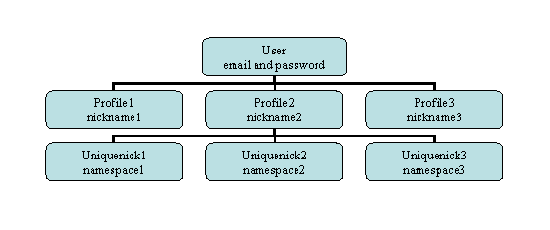
The above chart shows the relationship between a user, its profiles, and any potential uniquenicks. In the top row is a user, which is identified by an email and password combination. Each user then has one or more profiles. A profile is identified by a nickname and the user to which it belongs. Each profile also has an associated profileid which can be used to identify it. Each profile can then have zero or more uniquenicks. Each uniquenick is identified by the profile to which it belongs and the namespace in which it exists. Because it is unique in its namespace, a uniquenick and namespace combination can be used to identify a profile (and in turn a user).
Types
There are a few basic types used by GP:
- GPConnection
- This is an object that represents an instance of GP. A pointer to a GP object is passed as the first argument to every GP function. For example:
GPConnection gp;
gpInitialize(&gp, productID, namespaceID, GP_PARTNERID_GAMESPY);
- GPProfile
- This is an object that represents a particular GP profile (either local or remote). A GPProfile object is passed to functions like gpSendBuddyMessage and gpGetInfo, and it is returned in callbacks such as the GP_RECV_BUDDY_STATUS callback. A GPProfile object is equivalent to a profile ID. They are both int types, and can be used interchangeably.
- GPCallback
- This is a function type. Functions of this type are passed as parameters to gpSetCallback to set global (unsolicited) callbacks and to any functions that call a callback when completed (such as gpConnect). The first parameter is a pointer to this connection's GPConnection object, the second parameter is a pointer to a structure with callback-specific information, and the last parameter is a pointer to a user-supplied arg (which is passed as a parameter to the function to which the callback was passed). See gp.h for a list of all the arg structures.
typedef void (* GPCallback)(GPConnection * connection, void * arg, void * param);
- GPResult
- This is an enumeration of possible results from GP functions. A GPResult is returned from all GP functions (except for gpDestroy and gpDisconnect, which have no return value). It is also passed as the first result in most callback arg structures. In args, it signals if there has been an error and, if so, what type of error.
-
- GP_NO_ERROR
- There has been no error.
- GP_MEMORY_ERROR
- A call to allocate memory failed.
- GP_PARAMETER_ERROR
- A parameter passed to a function was invalid.
- GP_NETWORK_ERROR
- There was an error reported by the underlying network layer.
- GP_SERVER_ERROR
- One of the backend servers returned an error.
- GPEnum
- GPEnum is an enumeration of various constants that are used as function parameters or are returned in callbacks.
Initializing
The first step in using GP is to initialize it with gpInitialize:
GPResult gpInitialize
(
	GPConnection * connection,
	int productID,
	int namespaceID,
	int partnerID
);
You need to pass it a pointer to a GPConnection object that you have declared or allocated. Typically, you will just declare a global GPConnection object and use that for all of your GP function calls. The productID is a unique ID that identifies your product. If you do not have a product ID, contact devsupport@gamespy.com.
The namespaceID identified which namespace to login under. A namespaceID of 0 indicates that no namespace should be used. A namespaceID of 1 represents the default GameSpy namespace (the same namespace used by GameSpy Arcade). A namespaceID greater than 1 indicates a custom namespace. If uniquenicks will not be used, namespaceID should be 0. Otherwise it should be 1, unless a custom namespace has been assigned.
The partnerID will typically be set to the value defined by GP_PARTNERID_GAMESPY.
If this call succeeds (returns GP_NO_ERROR), then GP is initialized and ready to be used. This instance of GP will be valid until gpDestroy is called with the same object.
After GP has been initialized, the next thing to do is set the global callbacks using gpSetCallback:
GPResult gpSetCallback
(
	GPConnection * connection,
	GPEnum func,
	GPCallback callback,
	void * param
);
func is the type of callback, callback is the function to call for the callback, and param is a user-defined parameter that is passed to the callback. The possible values for func are:
- GP_ERROR
- This callback is called whenever a GP_NETWORK_ERROR or a GP_SERVER_ERROR occur. The arg passed to it is a GPErrorArg. The errorCode member of the arg can be checked for the specific cause of the error. If the "fatal" member of the arg is GP_FATAL, then an unrecoverable error has occurred, and the connection has already been disconnected, as if gpDisconnect were called. At this point, GP can be destroyed with gpDestory, or a new connection can be attempted with gpConnect (see below). If the "fatal" member of the arg is GP_NON_FATAL, then the user is still connected. At this point the application will likely show the user an error message (the "errorString" member of the errorArg can be used), and, optionally, ask the user to retry. The specific course of action can depend on the errorCode.
- GP_RECV_BUDDY_REQUEST
- This callback is called when another profile has made a request to add you to their buddy list.
- GP_RECV_BUDDY_STATUS
- This callback is called when there is updated status information for a buddy.
- GP_RECV_BUDDY_MESSAGE
- This callback is called when someone has sent you a buddy message.
- GP_RECV_BUDDY_UTM
- This callback is called when someone has sent you a UTM message.
- GP_RECV_GAME_INVITE
- This callback is called when someone invites you to play a particular game.
- GP_TRANSFER_CALLBACK
- This callback is called for status updates on a file transfer.
- GP_RECV_BUDDY_AUTH
- This callback is called when someone authorizes your buddy request.
- GP_RECV_BUDDY_REVOKE
- This callback is called when another profile revokes themselves as your buddy.
See the reference documentation for further details on each specific callback.
While GP is initialized, it must do some occasional processing to handle things like incoming buddy messages. gpProcess must be called by the application to allow for this processing. While it can be called as often as you like, it does not need to be called more than every second or so.
GPResult gpProcess
(
	GPConnection * connection
);
Connecting & Disconnecting
There are several functions that can be used to connect (login) to the Presence backend. gpConnect is used to login using a nick, email, and password. gpConnectUniqueNick allows you to connect using a uniquenick and password combination. gpConnectPreAuthenticated is used to connect using information from a partner authentication system.
GPResult gpConnect
(
	GPConnection * connection,
	const char nick[GP_NICK_LEN],
	const char email[GP_EMAIL_LEN],
	const char password[GP_PASSWORD_LEN],
	GPEnum firewall,
	GPEnum blocking,
	GPCallback callback,
	void * param
);

GPResult gpConnectUniqueNick
(
	GPConnection * connection,
	const char uniquenick[GP_UNIQUENICK_LEN],
	const char password[GP_PASSWORD_LEN],
	GPEnum firewall,
	GPEnum blocking,
	GPCallback callback,
	void * param
);
- nick, uniquenick, email, password
- identify the user account and the particular profile for that user. nick, uniquenick and e-mail are not case-sensitive, however password is.
- firewall
- can be GP_FIREWALL or GP_NO_FIREWALL. If GP_NO_FIREWALL, then direct connections to other users will be attempted when sending buddy messages. If this is GP_FIREWALL, then all buddy messages will be sent and received through the server.
- callback
- will be called when the connection attempt is finished (successfully or not).
Nicknames
There are several possible ways to use these functions, depending on how the application plans on functioning.
- GameSpyID Login with no uniquenick
- Pass a 0 namespaceID to gpInitialize, which tells GP not to use namespaces.
- When creating an account, use either gpNewUser or gpConnectNewUser, and set the uniquenick and cdkey parameters to NULL.
- Call gpConnect to initiate the connection to the backend server.
- GameSpyID Login with a uniquenick in the default namespace
- Pass a namespaceID of 1 to gpInitialize, which identifies the default GameSpy namespace. This is the namespace that is used by GameSpy Arcade.
- When creating an account, you'll want to call either gpNewUser or gpConnectNewUser and specify a uniquenick parameter. You can use this same value for the nick parameter as well.
- To login to an account that has already been created, use the regular gpConnect function. Once the account has logged in, you can check the uniquenick member in the GPConnectResponseArg to see if there is a uniquenick associated with the profile. If the uniquenick is @unregistered or @expired then there is no uniquenick registered with this profile. In that case, use gpRegisterUniqueNick to assign a uniquenick to the profile. gpSuggestUniqueNicks can be used to get a list of uniquenicks to present to the user.
- Make sure you do not use gpConnectUniqueNick for this method. The reason is that the default namespace expires uniquenicks after a certain period of inactivity, and you'll want to make sure the user can still login even if their uniquenick expired and was then taken by another user.
- GameSpyID Login with a uniquenick in a custom namespace
- Pass the namespace custom namespaceID to gpInitialize. Contact devsupport@gamespy.com for information on obtaining a custom namespace.
- If the namespace has expiring uniquenicks, then this method is identical to the above method, with the above exception of passing the custom namespaceID to gpIntialize.
- If the namespace does not expire its uniquenicks, then the main difference between this and the above method is that you can use gpConnectUniqueNick to login. Because the uniquenick doesn't expire, a user only needs to remember his uniquenick and password to login. However it is still recommended that a valid email address be used when creating an account, as this will allow the user to retrieve a forgotten password.
- Remote Authentication
- The remote authentication login method is used to login using information from a partner authentication system. You login using a token and a challenge, which are supplied by the partner authentication system. Contact devsupport@gamespy.com for further information on using this login method.
When ready to log off the connection, use gpDisconnect.
Creating & Deleting Profiles
To add a new profile to an existing account, use gpNewProfile:
GPResult gpNewProfile(
	GPConnection * connection,
	const char nick[GP_NICK_LEN],
	GPEnum replace,
	GPEnum blocking,
	GPCallback callback,
	void * param
);
- nick
- the nickname for the new profile.
- replace
- determines what should happen if the account already has a profile with the same nickname as the new one. Normally, this should be set to GP_DONT_REPLACE.
- If there is an existing nickname, an error will be generated, with the errorCode set to GP_NEWPROFILE_BAD_OLD_NICK (the last errorCode generated can be checked with gpGetErrorCode). At this point, the user can be asked if he would like to replace the old profile. If he selects yes, then call gpNewProfile again, this time using GP_REPLACE.
The user must already be logged on with the account he wants to add the profile to when this function is called. To login under the new profile, the current profile must first be disconnected with gpDisconnect, then gpConnect called for the new one.
If the user would like to remove an unwanted profile, gpDeleteProfile can be used. It deletes the currently logged-in profile, so the user must connect with that profile before deleting it. As soon as gpDeleteProfile is called, the connection will be disconnected. GP will still be initialized, but the user must then login with a new profile to connect, or gpDestroy can be called to terminate GP. There is no way to delete an entire user account - if there is only one profile in an account, it cannot be deleted.
Searching
If the user wants to find a friend to add as a buddy, or just wants to find information on a certain person, they can search for the profile based on certain information. This is done using gpProfileSearch:
GPResult gpProfileSearch(
	GPConnection * connection,
	const char nick[GP_NICK_LEN],
	const char email[GP_EMAIL_LEN],
	const char firstname[GP_FIRSTNAME_LEN],
	const char lastname[GP_LASTNAME_LEN],
	int icquin,
	GPEnum blocking,
	GPCallback callback,
	void * param
);
Using the parameters above, the search can be based on nick, email, first name, last name, ICQ UIN, or any combination of the parameters. Pass in NULL, or an empty string, for any of the string parameters to ignore that parameter while searching. To ignore the ICQ UIN, pass in 0 for icquin.
Getting & Setting Info
To get information on a particular profile, use gpGetInfo:
GPResult gpGetInfo(
	GPConnection * connection,
	GPProfile profile,
	GPEnum checkCache,
	GPEnum blocking,
	GPCallback callback,
	void * param
);
- profile
- the profile to get info on
- checkCache
- a flag that determines if the local cache should be checked for existing info on the profile. If it is GP_CHECK_CACHE, and the local cache has info on the profile, then that info will be used. If there is no locally cached info on the user, or if GP_DONT_CHECK_CACHE is used, then the info on the user will be retrieved from the backend server.
The info (either gotten locally or retrieved from the server) is passed to the callback in a gpGetInfoResponseArg:
typedef struct
{
  GPResult result;
  GPProfile profile;
  char nick[GP_NICK_LEN];
  char email[GP_EMAIL_LEN];
  char firstname[GP_FIRSTNAME_LEN];
  char lastname[GP_LASTNAME_LEN];
  char homepage[GP_HOMEPAGE_LEN];
  int icquin;
  char zipcode[GP_ZIPCODE_LEN];
  char countrycode[GP_COUNTRYCODE_LEN];
  int birthday;
  int birthmonth;
  int birthyear;
  GPEnum sex;
  GPEnum publicmask;
} GPGetInfoResponseArg;
The gpSetInfo group of functions are used to set information about the profile that is currently logged in. See the reference documentation for more info on all of the info that can be set. The user should be prompted to enter this information when a new account or new profile is created, and should have the option of changing the information at any later time.
Status
Every profile has a status, a status string, and a location string. This allows remote profiles to see if users on their buddy list are offline or online and, if online, what they are doing. There are currently six possible values for the status:
- GP_OFFLINE
- This profile is not connected to GP.
- GP_ONLINE
- This profile is online. This is the default status.
- GP_PLAYING
- This profile is playing a game.
- GP_STAGING
- This profile is in a staging room.
- GP_CHATTING
- This profile is chatting.
- GP_AWAY
- This profile is currently away from his computer (or the application).
Use gpSetStatus to set your status:
GPResult gpSetStatus(
	GPConnection * connection,
	GPEnum status,
	const char statusString[GP_STATUS_STRING_LEN],
	const char locationString[GP_LOCATION_STRING_LEN]
);
- status
- is one of the above values.
- If GP_OFFLINE is set, it will cause the user to appear to be offline on buddy lists, but the GP connection will not actually be disconnected.
- statusString
- a user-readable description of the status. For example, if status is GP_ONLINE, this will typically be "Online".
- locationString
- a URL that describes the user's location. This can be used to, for example, join the staging room or server that a buddy is in.
When a user connects to GP, the initial status is GP_ONLINE, the initial status string is "Online", and the initial location string is an empty string. These do not change until gpSetStatus is called. The status will be reset again to the defaults the next time the user connects to GP.
When a user logs in, he is sent a status update for each of his buddies. This is done through the GP_RECV_BUDDY_STATUS global callback, which is set with gpSetCallback. For example:
gpSetCallback(&gp, GP_RECV_BUDDY_STATUS, RecvBuddyStatusCallback, NULL);
Then, whenever a buddy's status changes, the callback is called again with the new information.
Buddies
In order to present the user with a buddy list, the application must do so by listening for buddy status messages (see above). After logging into to GP, the full list of buddies will be available, though the status of each will not be known until the SDK receives a status update. Subsequent unsolicited messages after the login will update these buddy statuses asynchronously and trigger the GP_RECV_BUDDY_STATUS callback for each.
If the user wants to add a new buddy to their buddy list, gpSendBuddyRequest should be used.
GPResult gpSendBuddyRequest(
	GPConnection * connection,
	GPProfile profile,
	const char reason[GP_REASON_LEN]
);
This causes a message to be sent to the profile the user wants to add. This remote profile will receive a GP_RECV_BUDDY_REQUEST callback (again, registered with gpSetCallback as shown above). If the remote profile wants to authorize the request, it should call gpAuthBuddyRequest, passing in the GPProfile for the profile who made the request. The requesting profile will then receive a message letting him know that the request was authorized. And, if he's online, he will also receive a status update for the buddy. If the remote profile wants to deny the request, it should call gpDenyBuddyRequest.
Adding buddies is not reciprocal - in other words, adding a buddy to your buddy list does not put you on that buddy's buddy list. Your new buddy still must make a request to add you to his buddy list, and you must authorize that in order for him to get you on his list.
To remove a buddy from your buddy list, use gpDeleteBuddy:
GPResult gpDeleteBuddy(
	GPConnection * connection,
	GPProfile profile
);
This will permanently delete the buddy from the buddy list. To get the buddy back on the list, a new request must be sent with gpSendBuddyRequest. Also, if the buddy being removed has you on his buddy list, that will not be affected.
To send a message to a buddy, use gpSendBuddyMessage:
GPResult gpSendBuddyMessage(
	GPConnection * connection,
	GPProfile profile,
	const char * message
);
This will send the given message to the profile, as long as it is actually an authorized buddy. If it is not, the call will fail (errorCode will be GP_BM_NOT_BUDDY). If GP_FIREWALL is set for either the local connection or the remote buddy, if the remote buddy is offline, or if a direct connection between buddies cannot be established for any other reason, the message will have to go through a backend server. If this happens, the message will be truncated. For this reason, buddy messages should not exceed about 4K bytes.
Blocked List
Similarly to a buddy list, GP also has the notion of a Blocked List. This list contains profiles with whom you want to block all GP communication to/from this player, including all form of messages, buddy requests, game invites, etc. Esentially, it is as if this player is invisible to you. Note that the backend automatically handles blocking the traffic for members of the block list, so the game does not need to do anything extra to support this once a player has been added to the blocked list for a profile.
The Blocked List is retrieved in full upon a successful login. If you do plan on using this functionality in your game, it's recommended to have some sort of UI view that players can see the members of their block list in order to allow them to remove from it. Peer chat channel traffic still needs to be manually blocked via this list as it is not currently handled by the backend. To enumerate through the Blocked List, you can use gpGetNumBlocked in conjunction with gpGetBlockedProfile. Examples of this are illustrated in the sample/test GP applications.
To add to the Blocked List, use gpAddToBlockedList:
GPResult gpAddToBlockedList(
	GPConnection * connection,
	GPProfile profile
);
To remove from the Blocked List, use gpRemoveFromBlockedList:
GPResult gpRemoveFromBlockedList(
	GPConnection * connection,
	GPProfile profile
);
Game Invitations
When considering game invitations, it is important to remember that invites are not technically restricted to players on the local buddy list. Any player may receive an invitation from any other player. Many developers will choose to implement their own design restrictions, such as limiting invites to clan or buddy list players, but this is not required.
Game invitations may be sent to a player using gpInvitePlayer:
GPResult gpInvitePlayer
(
	GPConnection * connection,
	GPProfile profile,
	int productID,
	const gsi_char location[GP_LOCATION_STRING_LEN]
);
The remote profile will receive a GP_RECV_GAME_INVITE callback for this invite request. The location parameter is an optional text string that usually contains the server IP and other connecting information. This parameter may be NULL. The max length for the location info is 255 characters. When compiling in Unicode mode, the location will be converted to ASCII.
An alternate design involves players inviting other players from a game lobby. In this case, the profileid of the remote player should be obtained from the Peer SDK peerGetPlayerInfo.
Appendix I: Nickname Checks
There are various checks that are made on uniquenicks before they can be registered.
- Length
- Uniquenicks must have at least 3 characters and no more than 20.
- Validity
- Alphanumeric characters (A…Z, a…z, 0…9). The first character may not be a digit.
- "#$%&()*+-./:;<=>?@[]^_{|}~ are allowed characters.
- In ASCII codes the range is 34 to 126, excluding 44 (comma) and 92 (backslash) and 39 (apostrophe).
- The 4 characters @+#: cannot be the first character in a nick.
- Stripping
- The uniqueness of a uniquenick is determined based on it's "stripped" version. This is the uniquenick with all non-alphanumeric characters removed. For example, "Joe", "%Joe%", and "Joe*" all have the same stripped version, "Joe".
- This is a per-namespace option, and it is on in the default namespace.
- Reserved Words
- There is a per-namespace list of reserved words. If the stripped version of a uniquenick matches a reserved word, then it cannot be registered. For example, "server" is a reserved word in the default namespace, so the uniquenicks "server", "%server%", and "server*" would not be allowed.
- Filtering
- Uniquenicks are filtered on a per-namespace basis. Each namespace can have a list of patterns which all uniquenicks are checked against before they are allowed to be registered. This is primarily used to prevent nicks with "bad words" in them.
Appendix II: PS3 Integration with NP
Remote Authentication - How to login with the PS3
GameSpy honors the Playstation Network (NP) single sign-on principle, by supporting NP handles via remote authentication. You would use the details for the current NP user you're logged in under and GameSpy's backend will provide you with the profile ID and connection handle to a 'shadow account', which acts just like any other GameSpy ID account for the rest of our API calls. Remote authentication is as easy as following these steps:
- Request and obtain your NP ticket from Sony using your unique NP ID. This is done by using the PS3 NP Manager lib and calling sceNpManagerRequestTicket followed by sceNpManagerGetTicket.
- Use the GameSpy AuthService (webservices folder) to convert the NP ticket into a remote auth token. This is accomplished by calling wsLoginPs3Cert. This requires you to specify a partnercode/namespaceID which is specific to the PS3. They are:
(Live) PS3 PartnerCode (or partnerid): 19
(Live) PS3 NamespaceID: 28
Note that the namespaceID/partnercode listed above applies to Live PS3 accounts registered in the 'NP' environment. If you are using Development accounts ('sp-int' environment) you will want to use the development namespaceID/partnercode otherwise the login will fail. For sp-int accounts, the namespaceID/partnercode pair to use instead is:
(Dev) PS3 PartnerCode: 33
(Dev) PS3 NamespaceID: 40 - Once you have the authtoken/partnerchallenge from the callback that returns from the above call, these values are used with our remote authentication systems to log the player into the GameSpy backend like you would normally with GameSpy ID. For example, to login to GP you would call gpConnectPreAuthenticated passing in the retrieved authtoken/partnerchallenge from the AuthService callback (initializing GP with the PS3 namespaceid and partnercode given above).
- If integrating with our ATLAS SDK, you would use the AuthService function wsLoginRemoteAuth (using the same namespaceID and partnerCode as the login Ps3Cert call) to log the player into the backend and retrieve the necessary Certificate/PrivateData for ATLAS.
The shadow accounts created for these users are in their own unique namespace for the NP system and their uniquenick == NP ID, so you will be able to use your PS3 account name as your uniquenick.
Note that the PS3 AuthService requires a cipher file in order to authenticate NP tickets for your title. This cipher is tied to your service ID used in NP and is submitted to us by Sony. You can start a support ticket with Sony to get this process started if you're experiencing authentication problems.
GP-NP Buddy + Block List Synchronization
By default on the PlayStation 3 platform, GP integrates with the NP system in order to seemlessly sync a PS3 user's NP Buddy list & Block list into their respective GP account. This sync effectively checks to see if any of your NP Buddies or Blocks have created GP 'shadow accounts' (e.g. have played a GameSpy-enabled PS3 title) and if so, will add them to your GP account in order to show up in-game.
This PS3 Buddy & Block sync takes place immediately after login. The SDK will first try to initialize NP Basic and NP Lookup - if either have already been initialized this is perfectly fine, the SDK will leave them intact and not destroy them upon calling gpDestroy assuming the game will take care of this. After initializing NP, the SDK waits a short period of time (GPI_NP_SYNC_DELAY) in order to allow NP Basic to acquire the buddy and block lists. After this delay, the actual sync takes place; note that since the SDK needs to verify if the NP players have valid GP accounts, gpProcess should be called routinely after the login in order to allow processing to take place (the sync is asynchronous).
To monitor the sync progress you can view the debugging commentary by defining GSI_COMMON_DEBUG and set the debug level appropriately (verbose tells you everything).
Keep in mind that the namespaceid and partnerid used by GP should correspond to the NP environment being utilized on the PS3, otherwise the sync will not work as intended. You can reference the above Remote Authentication section for more information about which identifiers to use for the respective NP environment.
In addition to the initial sync, GP also supports NP by mirroring requests to add players to their GP Blocked List. When you add to your blocked list on the PS3 using gpAddToBlockedList, the SDK will attempt to mirror this addition to the NP Block list as well. The SDK will perform an NP lookup to see if the player exists in the NP environment, and if so, then will try to add them to the NP block list. Please note that this process is also entirely asynchronous and dependent upon routinely calling gpProcess to allow the SDK to continue it's processing.