Unknown
From FreeFileSync
Variable Drive Letters
USB memory sticks or external hard disks often get different drive letters assigned when plugged into distinct computers. FreeFileSync offers two solutions to handle this problem:
Option 1: Specify a folder path by using the volume name:
Use [ZENJU-USB]\folder instead of G:\folder where ZENJU-USB
is the volume name of the USB stick which is currently mounted in drive G:\.
Note
It is not required to look up and enter the volume name manually. Just select the corresponding entry in the drop down menu.
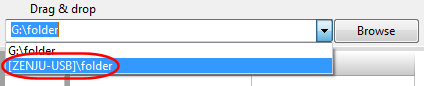
It is not required to look up and enter the volume name manually. Just select the corresponding entry in the drop down menu.
Option 2: Use a relative directory name:
- Use \folder instead of G:\folder
- Save and copy synchronization settings to the USB stick: G:\Backup.ffs_gui
- Start FreeFileSync by double-clicking on G:\Backup.ffs_gui
The working directory is then automatically set to G:\ by the operating system so that the relative path \folder will be resolved as G:\folder during synchronization.