Codes
From ControlPad
Codes
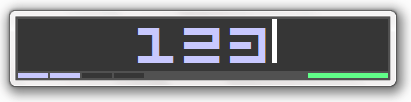
The syntax of the code you enter in the Code Window determines how ControlPad processes your request.
| Syntax | Example | Meaning |
|---|---|---|
| Numbers or Letters | 123 | Regular code - will run the associated command if any. If the rightmost led is on, this means that the command was found in the commands file. |
| mymail | ||
| +HHMM | +1730 | Beeper - will beep at 17:30. When the beeper beeps, press ESC to stop it. |
| +0930 | Will beep at 9:30. | |
| ++M | +15 | Beeper Timer - will beep in 15 minutes. |
| +2.5 | Will beep in two and a half minutes. | |
| Code+Code | 123+15 | Run multiple commands - will run the command associated with code 123 and code 15. For running several commands with one code, see Commands and Combination Commands. |
In addition, if you have enabled the SpeedPad feature, you may use this format in order to edit SpeedPad keys.
Use this syntax followed by the Numpad Divide key (/).
| Syntax | Example | Meaning |
|---|---|---|
| .Key | .2 | Assign a command to the 2 key. |
| .. | Assign a command to the Dot key. |