Report Problems with Excel
From Alchemex
Home >
Problems with Excel when Running Reports
Excel Frozen
When Sage Accpac Intelligence runs a report out to Excel it takes control of Excel and prevents user interaction with Excel. If a report runs into rendering problems it is possible that Excel can be left locked.
To release Excel:
In the Report Manager Module, select the Home object
Right click and select Unlock Excel or click the
 key on the toolbar.
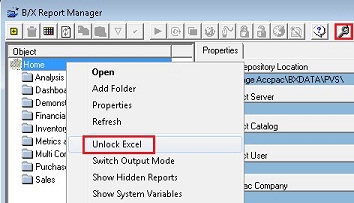
Excel will now be unlocked and user interaction will be allowed again.