Add or Remove Sort Fields
From Alchemex
Home >
Add or Remove Sort Fields
Sorting fields enables the user to pre determine the order of the data rows in the report.
Add or remove Sort Fields:
Select the report where you want to add or remove sort fields and click the Sort Fields Tab.
The Sort Fields that you have selected will be displayed.
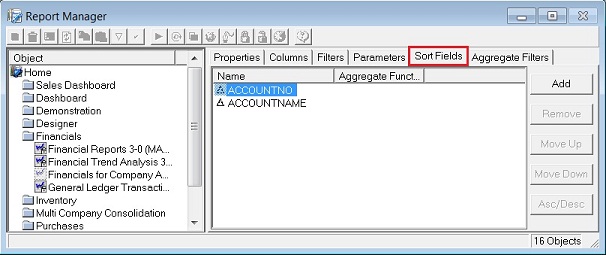
To add a Sort Field, click the Add button
 , the Choose Sort
Fields dialog box will appear.
, the Choose Sort
Fields dialog box will appear.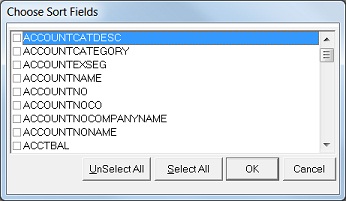
Select the Sort Field you would like to add and click OK.
You have now successfully added a sort field to your report.
To remove a sort field, in the Properties Window, click the Sort Field
you would like to delete and click the Remove
 button.