Stock Valuation Report
From Amicus


| Amicus | |
| Stock Valuation Report | |
| See Also Submit feedback on this topic | |
| Reports > Product Reports > Stock Valuation Report |
Glossary Item Box
The Stock Valuation Report lists the current value of products and cost to the company per product.
Click Reports on the Main Menu, followed by Product Reports then Stock Valuation Report option. Alternatively, click Products on the Toolbar followed by Reports, Product Reports then Stock Valuation Report option.
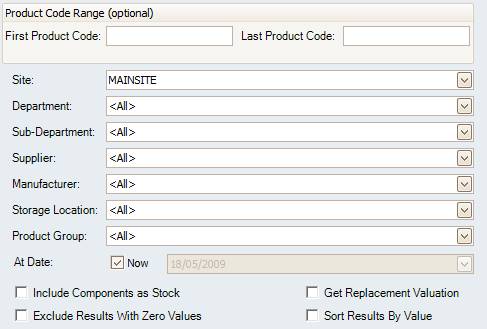
Figure : Stock Valuation Report options
Options
Select the Product Code Range (optional), Site, Department, Sub-Department, Storage Location, Supplier, Manufacturer, Product Group and the date when to perform the valuation upon or check, or leave Now checked to use the current date.
NOTE: Please keep checked unless absolutely necessary as the process will revert back to the closest stocktake to the date asked and subtract all transactions on each product requested.
Check Include Components as Stock to add components, Get Replacement Valuation to either report on stock At Cost Valuation or at Replacement Valuation, Exclude Results With Zero Values to filter results to only include stock with a value greater than 0 and Sort Results By Value to sort products by value.
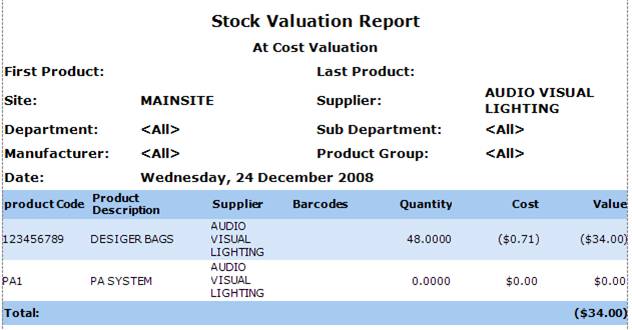
Figure : Stock Valuation Report sample report
Filters
The filters listed on the report include; First / Last Product, Site, Department, Sub-Department, Storage Location, Manufacturer, Product Group and the Date of the valuation.
Details
The stock is listed by Product Code / Description, Supplier, Barcodes, Quantity,
Cost is the price of the item when recieved from the supplier and input a stock receipt in to amicus.
i.e. you recieve x items for $3 and input a stock reciept for that amount. The cost at sale is $3 per item.
',event)">Cost and Value.