Sales Screen (Touch Screen Mode)
From Amicus


| Amicus | |
| Sales Screen (Touch Screen Mode) | |
| See Also Submit feedback on this topic | |
| Modules & Other Devices > Modules > Fuel Module > Fuel Controls > Sales Screen (Touch Screen Mode) |
Glossary Item Box
The NBS Fuel Module allows you to manage and control fuel sales and also allows you to control each of the fuel bowsers that are in operation at your business. At the top of this screen you can see each of the pumps that are availible and the respective state(s) (See: Pump States) that they are in. On the left hand side of the screen are the fuel control buttons which allows you to control each of the fuel pumps (see: Fuel Buttons) The location of the fuel pumps on the Fuel Sales Screen makes it easier to manage and control each of your pumps. Below is a figure of the Amicus Fuel Sales Screen.
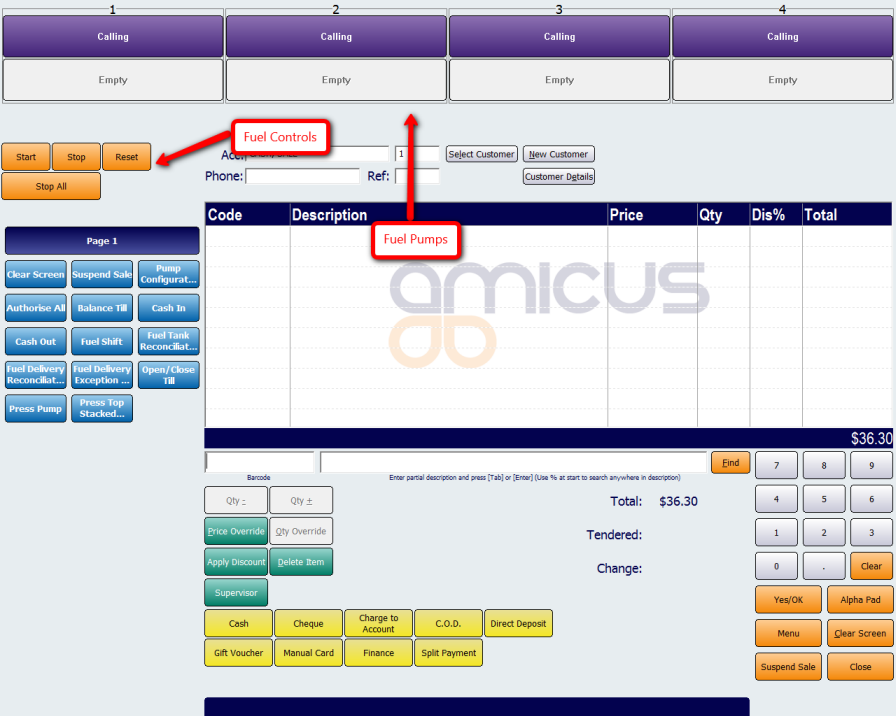
Figure : Sales Screen in Touch mode with fuel buttons