Pump Configuration
From Amicus


| Amicus | |
| Pump Configuration | |
| See Also Submit feedback on this topic | |
| Fuel Manual > Installing NBS Amicus Fuel > Pump Configuration |
Glossary Item Box
The Pump Configuration screen allows you to configure each of your individual fuel pumps so that they have names and descriptions that suit your business needs. To access the Fuel Configuration screen click on the Fuel Module from the Amicus Toolbar and then click on Pump Configuration. Once you do this the following screen will appear.
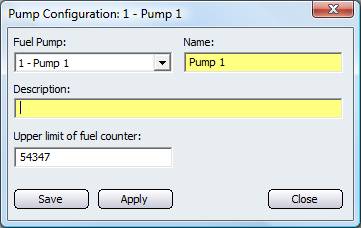
Figure : Pump individual Configuration
Once you are on this screen, select the pump you would like to configure by selecting it from the Fuel Pump dropdown box. Click on the Name field to give the selected pump a name of your choosing. You can also provide a description of the pump by clicking in the Description field.
The Upper limit of fuel counter refers to the total amount of fuel availible to the pump.
Save - Click on the save button to save the pump configuration.
Apply - The apply button will apply any changes that you have made on the configuration screen.
Close - Click on the close button to exit the Pump Configuration screen.