Product Stock Adjustments Report
From Amicus


| Amicus | |
| Product Stock Adjustments Report | |
| See Also Submit feedback on this topic | |
| Reports > Product Reports > Product Stock Adjustments Report |
Glossary Item Box
This report lists all the products which have had stock levels increased due to transfers or decreased due to loss, damage or out of date.
Click Reports on the Main Menu, followed by Product Reports then Product Stock Adjustment Report option. Alternatively, click Products on the Toolbar followed by Reports, Product Reports then Product Stock Adjustment Report option.
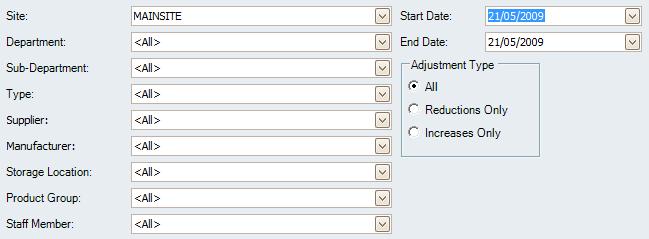
Figure : Product Stock Adjustments Report options
Options
The filters available for this report include; Start Date, End Date, Site, Department, Sub-Department, Type, Supplier, Manufacturer, Storage Location, Staff Member, Product Group and Adjustment Type either due to increases, decreases in stock or both.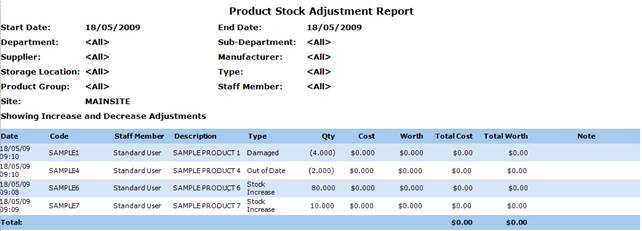
Figure : Product Stock Adjustments Report sample report
Filters
The report includes the selected filters; Start Date, End Date, Site, Department, Sub-Department, Type, Supplier, Manufacturer, Storage Location, Staff Member, Product Group.
Details
The stock adjustments are listed by; Date, Code, Description, Type, Qty, Cost, Worth, Total Cost and Worth, Note, Total.