Customer Transaction History Report
From Amicus


| Amicus | |
| Customer Transaction History Report | |
| See Also Submit feedback on this topic | |
| Reports > Customer Reports > Customer Transaction History Report |
Glossary Item Box
This report lists customer transactions with in a selected time period. Will also filter results based on customer names and transaction types.
Click Reports on the Main Menu, followed by Customer Reports then Customer Transaction History Report option. Alternatively, click Customers on the Toolbar followed by Reports, Customer Reports then Customer Transaction History Report option.

Figure : Customer Transaction History Report options
Options
Customers transactions can be filtered by; Start Date, End Date, Site, Ignore Sales, Ignore Payments, Ignore Reverse Sales, Ignore reverse Payments and Ignore Cash Customer while Select a Starting Letter(Optional) and Select Search Text allow the results to be filtered by a Starting character or Containing a word,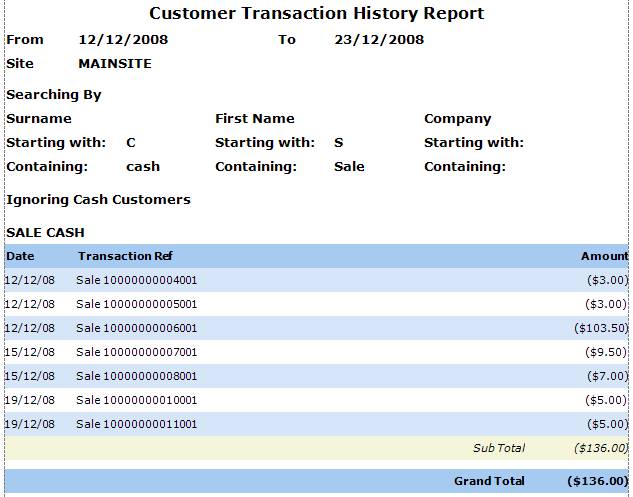
Figure : Customer Transaction History Report sample report
Filters
The report lists the search filters including; Start Date, End Date, Site the name & initials Searching By and ignored options.
Details
THe details listed include; Date, Transaction Ref, Amount of each transaction and the Sub-Total and Grand Total of transactions.