Customer Purchase Summary Report
From Amicus


| Amicus | |
| Customer Purchase Summary Report | |
| See Also Submit feedback on this topic | |
| Reports > Customer Reports > Customer Purchase Summary Report |
Glossary Item Box
This report will display a summary of Customer transactions for a period & a graphical representation of purchases made.
Click Reports on the Main Menu, followed by Customer Reports then Customer Purchase Summary Report option. Alternatively, click Customers on the Toolbar followed by Reports, Customer Reports then Customer Purchase Summary Report option.
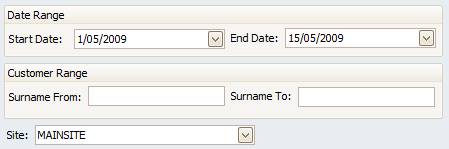
Figure : Customer Purchase Summary Report options
Options
Options include; Date Range, Customer Range by Surname and Site.
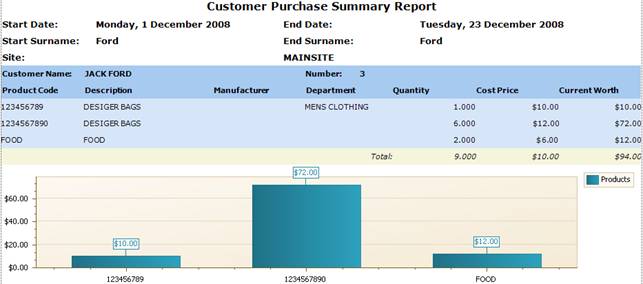
Figure : Customer Purchase Summary Report sample report
Filters
Start Date, End Date, Start Surname / End Surname and Site.
Details
Results are grouped into Customer Name / Number. Under each group transaction details are listed by Product Code, Description, Manufacturer, Department, Quantity, Cost Price,
The worth is the number of the items in stock by the most recently recieved $$cost$$.
i.e. you receive 4 items at a cost of $2 and put in a stock receipt for that cost, then recieve 2 items at a cost of $5 and put in a stock receipt at theat cost.
Using $$FiFo$$,
The total cost is $8 (4x$2) (for the first 4 items) plus $10 (2x$5) (for the second 2 items) = $18,
The total worth is $20 (4x$5) (for the first 4) plus $10 (2x$5) (for the second 2 items) = $30,
Using $$LiFo$$,
The total cost is $8 (4x$2) (for the first 4 items) plus $10 (2x$5) (for the second 2 items) = $18,
The total worth is $8 (4x$2) (for the first 4) plus $4 (2x$2) (for the second 2 items) = $12,
',event)">Current Worth and the Total of all transactions. The report also generates a The Bar Chart maps the relationship between the products and the Current worth.