Account Statement
From Amicus


| Amicus | |
| Account Statement | |
| See Also Submit feedback on this topic | |
| Reports > Customer Reports > Account Statement |
Glossary Item Box
This report displays a set of customers account balances on separate pages which are primarily used as billing statements.
Click Reports on the Main Menu, followed by Customer Reports then Account Statement option. Alternatively, click Customers on the Toolbar followed by Reports, Customer Reports then Account Statement option.
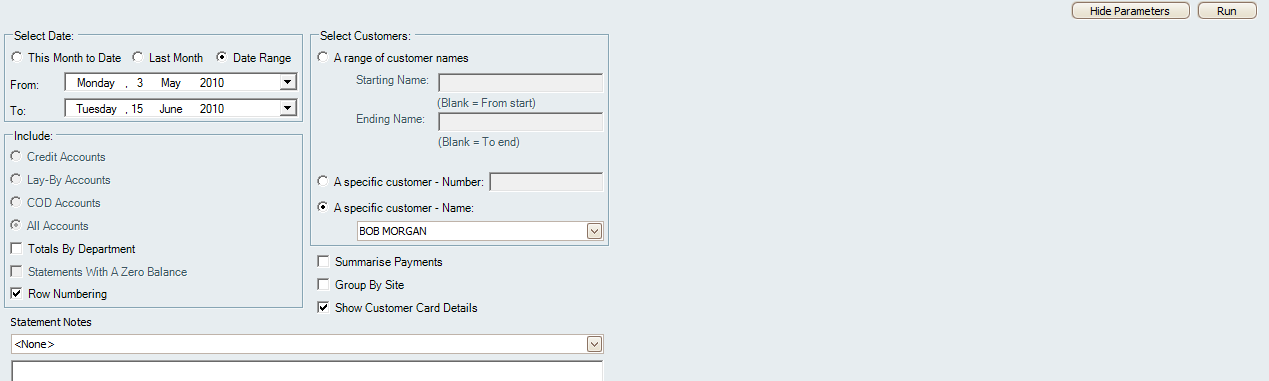
Figure : Account Statement options
Options
Select Date - Select the date range in which to view the customers balances. This can be a specific date period, the current month, or the previous month balances.
Select Customers - Select either a specific customer or a group of customers to view on the statement. This can be a name range or a specific customer number.
Include - Select the type of options and accounts to include in the statements, including Credit, Lay-By, Cash On Delivery (COD) or All Accounts. Check Totals By Department to include a Sub-Total of transactions per department. Check Statements With A Zero Balance to include customers who don’t have a balance in arrears. Check Row Numbering to as row numbering to the list of transactions.
Check Summarise Payments to sort payment types by Debit & Credit.
Check Group By Site to group transactions by site.
Statement Notes - Adds a note to the statement.
Check the Show Customer Card Details checkbox if you would like the report to show the customers card details.
Once you have configured the filters, click on the Run button to display the report based on the selected filters.
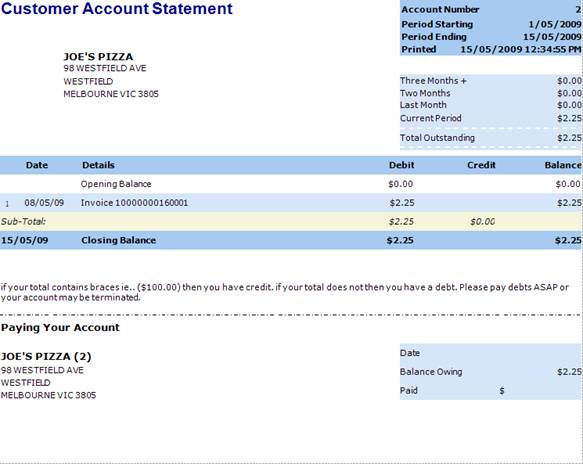
Figure : Sample customer Account Statement
Details
The Details show the Customers Name, Address and Customer ID, along with the payment period, when the bill was Printed, and the amount outstanding over the previous Monthly Periods. The bill itself displays transaction Date, any Details of the type of activity, Debit and Credit amount, Site Name, Sub-Total, Note Field and the Paying Your Account.