Union Reports
From Alchemex 7.1
Home >
Union Reports
A Union Report  is used to
merge rows of data from disparate sources into a single a report. The
Union Report has pointers to other normal Reports and it simply runs out
the raw data from the specified Reports (referred to as Union Sub Reports
when referenced in a Union Report) sequentially into a single Workbook.
The Union Report can have its own template file specified and the template
files of the Union Sub Reports are not used.
is used to
merge rows of data from disparate sources into a single a report. The
Union Report has pointers to other normal Reports and it simply runs out
the raw data from the specified Reports (referred to as Union Sub Reports
when referenced in a Union Report) sequentially into a single Workbook.
The Union Report can have its own template file specified and the template
files of the Union Sub Reports are not used.
Method
- Right-click on a Folder and choose Add Report. Choose Union Report.
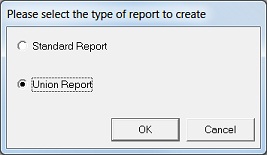
- You will be prompted for the reports to include as Union Sub Reports in the Union Report.
- Choose one or more existing reports.
To add subsequent Union Sub Reports to the union report:
- Double click on the Union Report.
- Select the object Union Sub Reports.
- Right-click and select Add Union Sub Reports.
It should be noted that a Union Report will simply pull the raw data from all Union Sub Reports and sequentially output the data sets into the Output Book. All properties set on the source reports are ineffective when they are run as Union Sub Reports in a Union Report. All filtering and sorting logic is applied to each Union Sub Report before it is output into the Union Report Template and the logic between Union Sub Reports is unrelated.
Note: By default the data from the Union Sub Reports will be output into the same worksheet. This behavior can be overridden though by setting the Output Sheet property for the individual Union Sub Reports.
Setting the Output Sheet property:
- Open up the Union Report in the Object window (by double clicking).
- Open the Union Reports object so that the individual Union Sub Reports become visible.
Select each Union Sub Report and then set the Output Sheet property to the number of the Sheet to output the data to (for example, 1 for the left most sheet in the book).
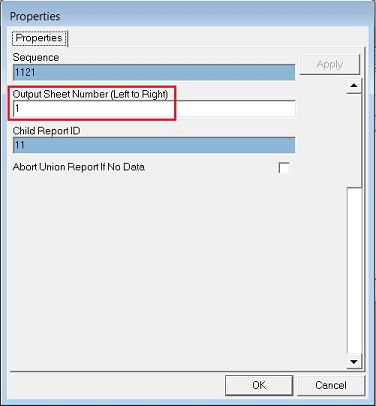
Note: The specified output sheet must exist in the Union Reports output template.
If the data is configured (or defaulted) to the same sheet for the Sub Reports then it makes sense that the data is comparable. Although you could specify any reports to be the Sub Reports for the Union Report, it only makes sense to specify Union Sub Reports that have comparable data and with the corresponding Display Fields laid out in the same order in all the Sub Reports to go to the same Output Sheet, so that in the final Workbook there is like data in each column. If the data is not similar then it should be output to different sheets.