Map trace trails
From eCtune
Map trace trails
What is map trails?:Map trails highlights the area of the fuel maps where the
ecu read during a pull. This for quick reference to find where the afr was not
what you want.
To use live plot Rpm vs Afr/Boost wideband
o2 logging must be enabled
Steps for map
trails:
Enable map trails
Enable Live plot Rpm vs
Afr/Boost
Make a pull(dyno/street)
Look at the plot
Spot a wrong AFR and
lookup in the table with map trail where that spot is
Enabling Map Trails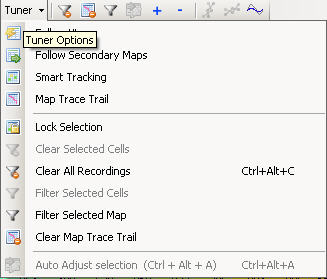
Enable map trails by clicking the map
trace trail menu item
Clearing Map Trails: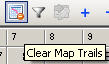
Click this icon to
clear map trails
Click the menu item Clear Map Trace
Trail from above screen.
Example: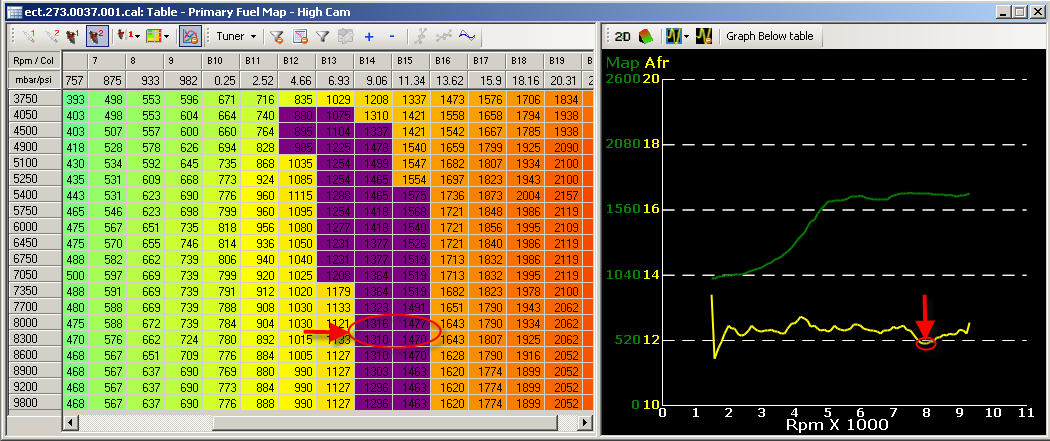
With map trails you see where the ecu read during a pull.
You know where the dip happend and you can change the 2 rows(8000/8300)(mabye from column 14 to the end)