RPM scalar setup
From eCtune
RPM scalar setup
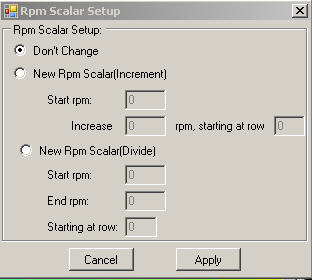 Rpm scalar
setup
Rpm scalar
setup
Note: This will adjust the currently selected rpm scale. For example if the low cam primary map is selected, then the scalar changes will be applied to that table only.
Increment
Start
rpm: The rpm the
first given row will
get
Increase:
Amount of rpm the following row get increased
Starting
row: Which row you start
adjusting
Note: You
can make the first row increase e.g. 300 rpm and afterward 500 rpm
Divide
Start
rpm: The start rpm
of your rpm band
End
rpm: The
end rpm of your rpm band
Starting
row: Start
row
Note:
The rpm band will be devide into row(start) till the last row.