MDI Frames
From Win32++
|
MDI Frames |
Description
Multiple Document Interface (MDI) frames are capable of managing and displaying a number of MDI children. These MDI Children have their own view window.
Refer to the MDIFrame and MDIFrameDemo samples for demonstration of how to CMDIFrame and CMDIChild to create MDI applications.
MDI Frame Components
The following diagram illustrates a typical MDI frame application.
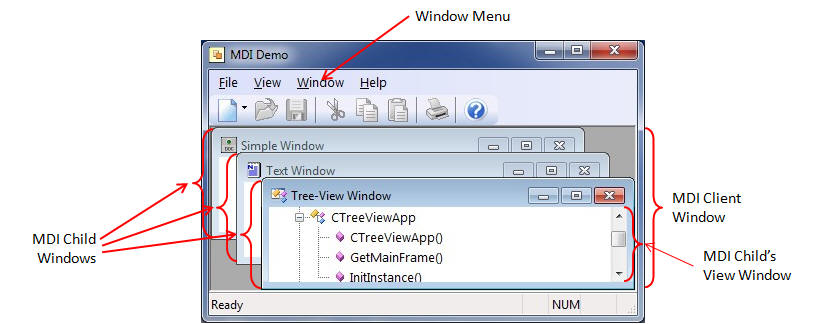
The toolbar and menubar are used to accept input from the user. The status bar is used to display status information.
Defining the MDI Frame
To define a MDI frame, inherit a class from CMDIFrame as shown below.
// MDI frames are inherrited from CMDIFrame
class CMainMDIFrame : public CMDIFrame
{
public:
  CMainMDIFrame(void);
  virtual ~CMainMDIFrame();

protected:
  virtual BOOL OnCommand(WPARAM wParam, LPARAM lParam);
  virtual int  OnCreate(LPCREATESTRUCT pcs);
  virtual void OnInitialUpdate();
  virtual void SetupToolBar();
  virtual LRESULT WndProc(UINT uMsg, WPARAM wParam, LPARAM lParam);
};
Unlike SDI frames, we do not need to specify a view window for the frame. The Win32++ framework automatically assigns the MDI client window as the view window for the frame. The constructor for our MDI frame could look like this.
CMainMDIFrame::CMainMDIFrame()
{
  // Set the registry key name, and load the initial window position
  // Use a registry key name like "CompanyName\\Application"
  LoadRegistrySettings(_T("Win32++\\MDI Frame"));
}
Defining a MDI Child
To define a MDI child, inherit a class from CMDIChild as shown below.
// Declaration of CSimpleMDIChild
class CSimpleMDIChild : public CMDIChild
{
public:
  CSimpleMDIChild();
  virtual ~CSimpleMDIChild();

protected:
  virtual BOOL OnCommand(WPARAM wParam, LPARAM lParam);
  virtual void OnInitialUpdate();
  virtual LRESULT WndProc(UINT uMsg, WPARAM wParam, LPARAM lParam);

private:
  CSimpleView m_View;
};
The MDI Child's Menu and View
Normally each different type of MDI child has a different menu. The MDI Frame's menu is changed to the MDI child's menu when the MDI child becomes the active window. The menu for each MDI child is usually defined in the resource script file (resource.rc).
The view window for the MDI child is set in the same way we would set the view window for a SDI frame. The constructor for the class inherited from CMDIChild would typically look something like this.
CMDIChildSimple::CMDIChildSimple()
{
  SetView(m_View);
  HINSTANCE hResource = GetApp()->GetResourceHandle();
  HMENU hChildMenu = LoadMenu(hResource, _T("MdiMenuSimple"));
  SetHandles(hChildMenu, NULL);
}
Adding a MDI child window
The AddMDIChild function is used to add a MDI child window. The following code demonstrates how to create a new MDI child window in response to a selection from the frame's menu or toolbar.
BOOL CMainMDIFrame::OnCommand(WPARAM wParam, LPARAM /*lParam*/)
{
  switch (LOWORD(wParam))
  {
  case IDM_FILE_NEW:
    AddMDIChild(new CMDIChildView); // CMDIFrame deletes this pointer
    return TRUE;
  }
  return FALSE;
}
Note that the pointer created by "new" is deleted automatically by CMDIFrame when the MDI child window is destroyed.