SessionConfiguration Object
From SecureCRT
 SessionConfiguration
Object
SessionConfiguration
Object
Description
The SessionConfiguration object provides methods for accessing session configuration through scripting.
Syntax
Remarks
Can be used in the following cases:
· Change settings in an existing session before connecting.
· Convert an Excel spreadsheet to save SecureCRT or SecureFX (if installed) sessions.
SessionConfiguration Object Methods
|
| |
|
| |
|
| |
|
| |
|
|
Description
Connects to a session in a tab.
Syntax
Set objTab = object.ConnectInTab
Remarks
This method returns a Tab object.
Examples:
Connect in a tab using a predefined session:
Set tab = crt.session.ConnectInTab
Connect in a tab to "myhost" on port 2345 using the Telnet protocol and Default session parameters:
Set tab = crt.session.ConnectInTab
Description
Gets the value of the specified option.
Syntax
varname = object.GetOption(OptionName)
Remarks
OptionName is a string parameter that is the name of the option. This method returns the value of the specified option. If the option is a string type (S), a string is returned. If the option is a multi-string (Z), an array of strings is returned. If the option is a DWORD (D), an integer is returned.
Example:
Set objTab = crt.GetScriptTab
Set objConfig = objTab.Session.Config
szUsername = objConfig.GetOption("Username")
szSessionName = objTab.Session.Path
MsgBox "Username for current session (" & _
szSessionName
& ") = " & szUsername
vPortForwards = objConfig.GetOption("Port Forward Table V2")
nElements = UBound(vPortForwards)
If nElements = -1 Then
MsgBox
"No port forward configuration defined"
Else
MsgBox
nElements + 1 & _
"
port forward entries exist in this session (" & _
objTab.Session.Path
& ")"
End If
Description
Saves the configuration.
Syntax
object.Save [SessionPath]
Remarks
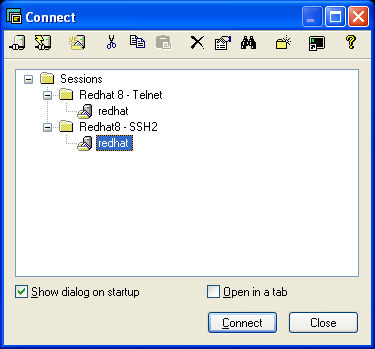
If SessionPath is not provided, the configuration will be saved to the .ini file that is associated with the Config object used. If the SessionPath provided is the same as an existing session configuration, the existing .ini file will be overwritten with the settings contained in the Config object used. If the SessionPath provided does not exist, a new session of that name will be created in the session path specified. Note that the session path is not a full file system path, rather it is the path relative to the folders as they appear within the SecureCRT Connect dialog, with the built-in "Sessions" folder being the "root" path. In the graphic below, the path to the selected session would be Redhat8 - SSH2\redhat.
Example:
' Save configuration to
a new session.
objConfig.Save "Redhat8 - SSH2\redhat - PF"
Description
Sets the specified option to the specified value.
Syntax
object.SetOption OptionName, Value
Remarks
OptionName is a string parameter that is the name of the option. Value is the value to set the option to. If the option is a string type (S), a string should be specified for the value. If the option is a multi-string (Z), an array of strings should be specified for the value. If the option is a DWORD (D), the value should be numeric. If there is an error this method will display a error message box. If the errors are not being displayed, the error message can be retrieved by using crt.GetLastErrorMessage.
Example:
Config.SetOption "Terminal Protocol Name", "SSH2"