Translating the Import Synonyms XML Files
From ACT! LDK
Translating the Import Synonyms XML Files
The ACT! Import Wizard references several XML files containing synonyms (aliases) for default mapping of company and contact field names between ACT! and other source files, such as Microsoft Excel, tab-delimited (.TXT), and comma-separated value (.CSV) files.
These import synonyms XML files are named:
- CompanyFieldSynonyms.xml
- ContactFieldSynonyms.xml
Note: A person with an understanding of XML should perform the translation.
To translate the Import synonym files
- Make a copy of the file before you open it.
Caution: Do not rename the file. The ACT! Import Wizard references the files as named above.
- Open the file using an XML or text editor.
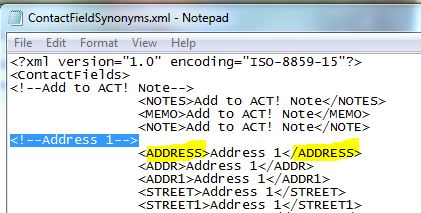
- Translate the text that appears in the opening and closing brackets. See graphic below.
The text that appears between the opening and closing set of brackets is the ACT! field name the synonym is mapped to. In the example below, the text is Address 1.
- Save the xml file.