Unknown
From FreeFileSync
Exclude Items
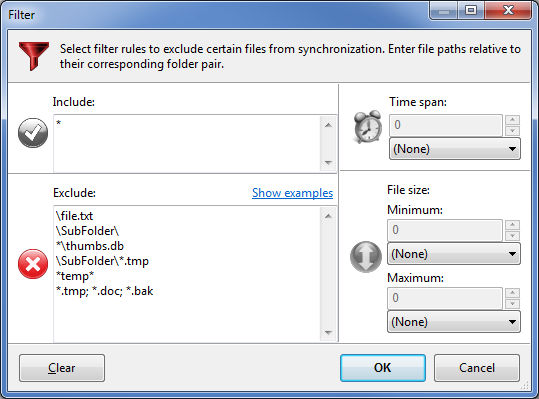
Files and directories are only considered for synchronization if they pass
all filter rules. They have to match at least one entry in the
include list and none of the entries in the exclude list as presented in the filter configuration dialog:
- Each list item must be a file or directory path relative to synchronization base directories.
- Multiple items must be separated by ; or a new line.
- Wild cards * and ? may be used: * means zero or more characters while ? represents exactly one character.
Example: Exclude items for mirror-sync from C:\Source to D:\Target
|
Description |
Exclude |
|
Single file C:\Source\file.txt |
\file.txt |
|
Single folder C:\Source\SubFolder |
\SubFolder\ |
|
All files (and folders) named thumbs.db |
*\thumbs.db |
|
All *.tmp files located in SubFolder only |
\SubFolder\*.tmp |
|
Files and folders containing temp somewhere in their path |
*temp* |
|
Multiple entries separated by semicolon |
*.tmp; *.doc; *.bak |
|
Exclude all files and folders located in subdirectories of base directories |
\*\* |
|
Exclude only *.txt files located in subdirectories of base directories |
\*\*.txt |
- For simple exclusions just right-click and exclude one item or a list of items directly on main grid via context menu.
- A filter phrase is compared against both file and directory paths. If you want to consider directories only, you can give a hint by appending a path separator (\).