Configuring a Custom EQ
- Scroll-select the Custom EQ option.
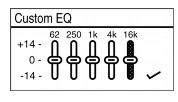
Five vertical control sliders appear in the OLED display, each lever controlling successively higher frequencies.
62 controls the bass, 250 adjusts the lower mid-range, 1k adjusts the the mid-range, 4k adjusts the upper mid-range, and 16k adjusts the treble.
Select  , and press the Scroller to confirm the Custom EQ setting.
Repeat steps 2 to 4 to adjust another control level.