Configuring a Custom EQ

From Creative ZEN Wav player

Configuring a Custom EQ

  1. Select Custom EQ.


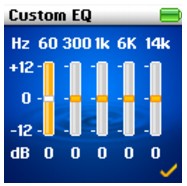
    Each slider on the Custom EQ screen represents successively higher frequencies that can be adjusted.
  • 60 adjusts the bass frequency
  • 300 adjusts the low mid-range frequency
  • 1k adjusts the mid-range frequency
  • 6k adjusts the upper mid-range frequency
  • 14k adjusts the treble frequency.
  • Select a slider, and push the 5-way Navigation/Volume Joystick up and down to move the control knob up or down to vary the amount of boost or reduction in the selected frequency range.
  • Push the 5-way Navigation/Volume Joystick right or left to select the remaining sliders, and repeat step 2.
  • Select the check mark to save and enable the Custom EQ settings.