Configuring a Custom EQ

From Creative ZEN Neeon 2

Configuring a Custom EQ

  1. Select Custom EQ.


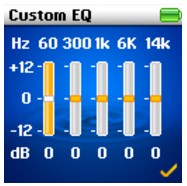
    Each slider on the Custom EQ screen represents successively higher frequencies that can be adjusted.
  • 60 controls bass frequency
  • 300 adjusts the low mid-range frequency
  • 1k adjusts the mid-range frequency
  • 6k adjusts the upper mid-range frequency
  • 14k adjusts the treble frequency.
  • Move the Scroller up or down to adjust the level.
  • Press the Scroller to confirm the level adjustment.
  • Move the Scroller down to select the next slider.
  • Select the check mark to save and enable the Custom EQ settings.