Edit Parameter Properties
From Alchemex
Home >
Edit Parameter Properties
To edit the properties of a Parameter, select the Filter you want to
edit and click on the properties icon  . The Properties
window will be displayed.
. The Properties
window will be displayed.
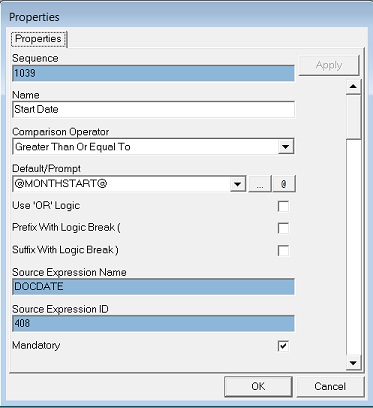
Enter your amendments in the active fields provided. Click here for help on using Comparison Operators.
| Check Box Option | Description |
|---|---|
 |
By default when multiple filters are used on a report they are applied using Boolean AND logic. So for data to satisfy filters with AND logic all the filters must evaluate to true. When OR logic is used only one of the filters needs to evaluate to true. |
 |
Where complex Boolean Logic is needed for combing filters that use combinations of AND and OR logic then logic breakers can be used to group filters together. Use this setting to prefix the filter with a logic breaker. |
 |
Where complex Boolean Logic is needed for combing filters that use combinations of AND and OR logic then logic breakers can be used to group filters together. Use this setting to suffix the filter with a logic breaker. |
When you have entered your selections click on OK.