Date Formats
From Alchemex
Home > Connector > Maintaining the Connector > Date Formats
Date Formats
Different database systems store and recognise dates in different formats. Sage Accpac Intelligence attempts to hide this detail from its end users by translating dates at run time into a recognizable format before passing the date to the underlying Database System. In order for Sage Accpac Intelligence to know how the Database System is expecting the dates, the Data Connection (property Date Format) in the Connector is pre configured. Additionally, different Database Systems expect dates to be delimited with different characters. This is also configured on the Data Connection object as the property Date Delimiter.
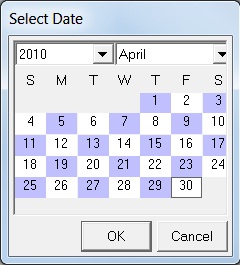
For the end user dates in report Parameter boxes can always be picked using the Sage Accpac Intelligence Calendar thus hiding the common problems that occur with ambiguous date formats. The list below shows date formats that are recognized by some of the more common Database Systems.
| Date Format | Date Delimiter | |
|---|---|---|
| Pervasive | M/DD/YYYY | ' |
| DBASE | YYYY/MM/DD | # |
| SQL Server | DD-MMM-YYYY | ' |
| Access | M/DD/YYYY | # |
| Oracle | DD-MMM-YYYY | ' |
Note: Changing these settings on a Connection or Connection Type object can cause report execution problems and may cause incorrect date ranges to be returned. For supported Connection types in the Sage Accpac Intelligence Connector you should not change the settings for these fields.
Selecting Dates in Report Parameters
It is preferable to use the Sage Accpac Intelligence Calendar when selecting Dates in Parameters. If you prefer to key in Date values for a Report Parameter or Filter it is best to use the format dd mmm yyyy to avoid ambiguity and Date errors. e.g. 19 January 2008 OR 19 Jan 2008.
In this way Sage Accpac Intelligence can unambiguously translate the date into the format expected by the underlying Database system. The Sage Accpac Intelligence Calendar is shown below: