Volume Product Pricing Report
From Amicus


| Amicus | |
| Volume Product Pricing Report | |
| See Also Submit feedback on this topic | |
| Reports > Pricing Reports > Volume Product Pricing Report |
Glossary Item Box
This report displays the volume adjustments on products, i.e. the standard sale price for 1 item, and bulk sales of the same item.
Click Reports on the Main Menu, followed by Pricing Reports then Volume Product Pricing Report option. Alternatively, click Products on the Toolbar followed by Reports, Pricing Reports then Volume Product Pricing Report option.

Figure : Volume Product Pricing Report options
Options
As At Date, Department, Manufacturer, Sub-Department, Supplier, Storage Location, Site and the Only products with volume adjustments check box will only list products with volume adjustments.
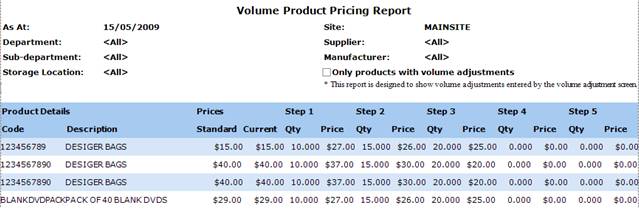
Figure : Volume Product Pricing Report sample report
Filters
The results are filtered by; As At date, Site, Department, Manufacturer, Sub-Department, Storage Location and Supplier.
Details
The details of this report include the Product Code, Description and the Standard and Current sell prices of an individual item.
Step n - Displays a products sell price for x items, where x is the number of products of this type needed to be sold in one transaction to be sold at this price. i.e. if 10 Designer Bags are sold in one transaction then each bag will cost $27, if 15 Designer Bags are sold in one transaction then the will be $26 per bag.