Supplier Stock Receipts
From Amicus


| Amicus | |
| Supplier Stock Receipts | |
| See Also Submit feedback on this topic | |
| Reports > Supplier Reports > Supplier Stock Receipts |
Glossary Item Box
This report gives a list of the recept numbers for invoices payed to a suppliers.
Click Reports on the Main Menu, followed by Supplier Reports then Supplier Stock Receipts option. Alternatively, click Supplier on the Toolbar followed by Reports, Supplier Reports then Supplier Stock Receipts option.

Figure : Supplier Stock Receipts options
Options
Select the Start Sate Time, End Date, Supplier and Site.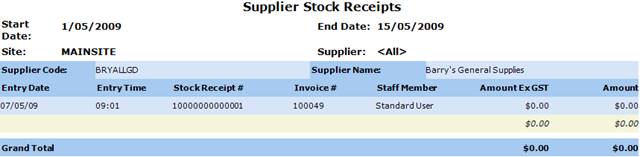
Figure : Supplier Stock Receipts sample report
Filters
The Selected filters are displayed on the report as Start Date, End Date, Site and Supplier.
Details
The suppliers stock receipts are grouped by Supplier Code, Supplier Name, Entry Date, Entry Time, Stock Receipt #, Invoice #, Staff Member, Amount ExGST paid, Amount paid inc GST and the Grand Total.