Supplier Aged Balance Report
From Amicus


| Amicus | |
| Supplier Aged Balance Report | |
| See Also Submit feedback on this topic | |
| Reports > Supplier Reports > Supplier Aged Balance Report |
Glossary Item Box
The Supplier Aged Balance Reports list balances owing to suppliers in a monthly period.
Click Reports on the Main Menu, followed by Supplier Reports then Supplier Aged Balance Report option. Alternatively, click Supplier on the Toolbar followed by Reports, Supplier Reports then Supplier Aged Balance Report option.

Figure : Supplier Aged Balance Report option
Options
Select the date As At to view the supplier balances up untill.
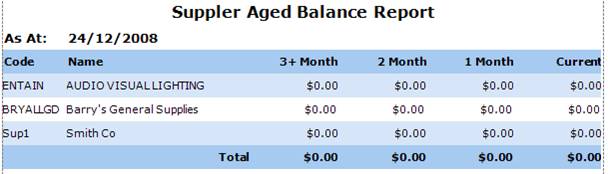
Figure : Supplier Aged Balance Report sample report
Filters
The date As At date selected is displayed on the report.
Details
The supplier balances are listed by supplier Code, Name, the Month displays the value of the suppliers balance owing in the current month (as of the As At date), one month from this date, two month from this date and three plus months from this date. FInaly the Total balance owing in each period.