Department Sales by Month
From Amicus


| Amicus | |
| Department Sales by Month | |
| See Also Submit feedback on this topic | |
| Reports > Sales Reports > Department Sales by Month |
Glossary Item Box
The Department Sales by Month report gives summaries of all the sales made within individual departments for each month, if any sales have been made in that month.
Click Reports on the Main Menu, followed by Sales Reports then Department Sales By Month option. Alternatively, click Sales on the Toolbar followed by Reports, Sales Reports then Department Sales By Month option.

Figure : Department Sales by Month options
Options
Select the Start Date, End Date, Site and Department.
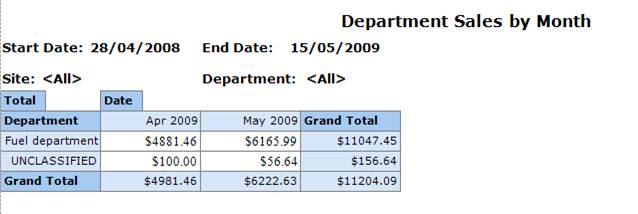
Figure : Department Sales by Month sample report
Filters
The report will list the Start End Dates, Department and Site of the sales.
Details
Results are grouped by Department and are listed by the Date Month & Year the sales occurred along with the Total and Grand Total of each departments sales.
Graph
The line graph shows margins of total sales per department for each month.
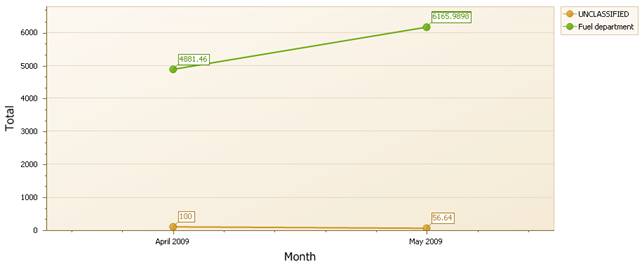
Figure : Department Sales by Month graph